HOW TAXSOFT WORKS
Your FBR Invoicing Workflow, Step by Step
Taxsoft brings invoice preparation, validation, FBR submission, and record keeping into one structured workflow, so your team can manage each stage from one place.
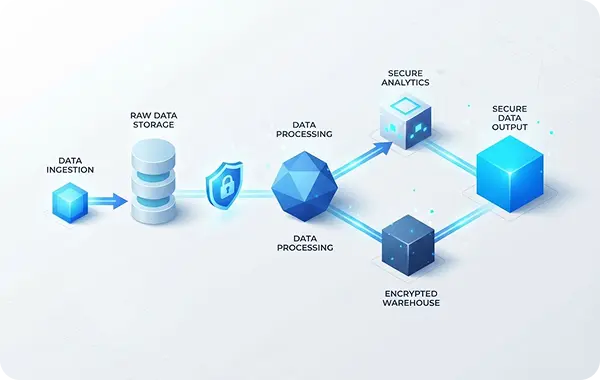
Taxsoft brings invoice preparation, validation, FBR submission, and record keeping into one structured workflow, so your team can manage each stage from one place.
See how Taxsoft takes an invoice from business setup through validation, FBR submission, and organized record keeping.

Add your business details and the information needed to prepare digital invoices

Enter buyer, item, quantity, price, and applicable tax details through the Taxsoft system.

Validate invoice details, correct any errors, and submit to FBR through PRAL. Receive confirmation after successful submission.

Access submitted invoices, FBR confirmation details, and QR-enabled invoice records whenever you need them.

Add your business details, NTN/STRN information, province, and other required information before you begin creating digital invoices.
Enter buyer details, items, quantities, prices, tax rates, discounts, and other required invoice information through one structured form.
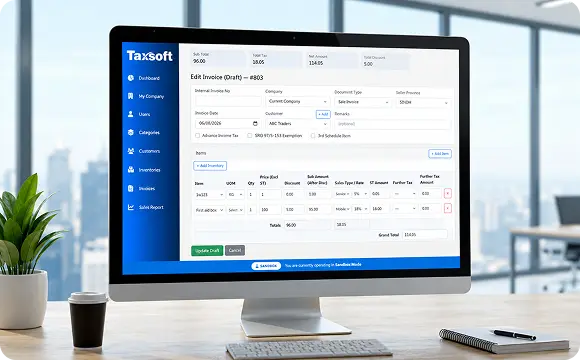
See how Taxsoft replaces scattered invoice handling with a clearer, more organized digital workflow

“Taxsoft gives our team a much clearer way to prepare and manage FBR invoices. The whole process feels more organized than working across separate files.”
Distribution Business
“Managing several client businesses from one place makes a real difference. Invoice records and submission information are much easier to keep organized.”
Independent Tax Practice
“The workflow is straightforward. We can prepare the invoice, check the required information, submit it, and keep the resulting records together.”
Manufacturing Business
Bring invoice creation, validation, FBR submission, and record keeping into one structured Taxsoft workflow.